Google Ads puts your business in front of people at the exact moment they search for what you sell. Done well, it is one of the fastest ways to win new customers. Done badly, it burns through a budget in days with little to show for it.
This guide explains how to run Google Ads step by step, from setting a goal to reading your results, so your first campaign has a real chance of paying for itself.
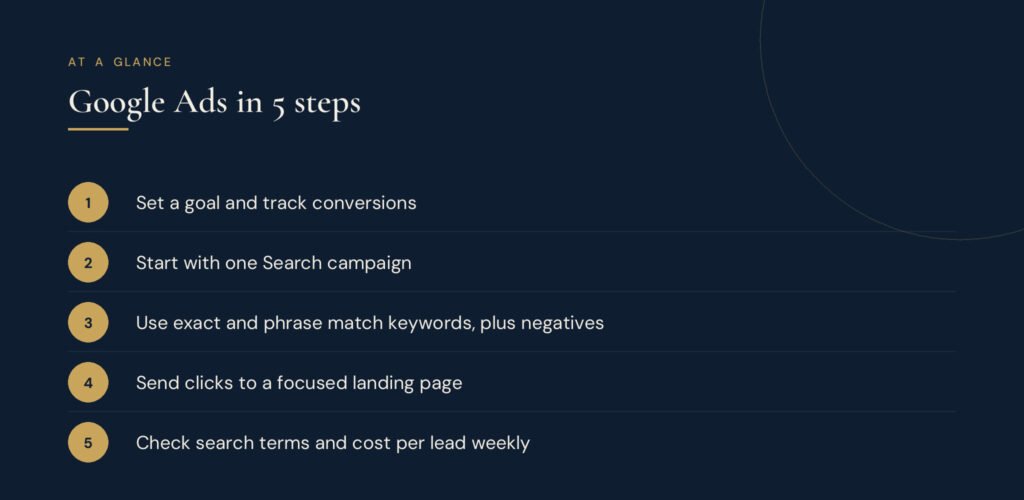
Step 1: Decide what a result looks like
Before you open Google Ads, decide what you want people to do after they click. For most small businesses it is one of these:
- Call you
- Fill in a contact or quote form
- Book an appointment
- Buy a product online
This becomes your conversion, the action you will track and optimise for. Also decide roughly what a new customer is worth to you. If an average customer brings in $600 of profit, you can afford to pay far more for a lead than a business making $20 per sale. Our guide to customer acquisition cost shows how to work this out.
Step 2: Set up your account and conversion tracking
Create a Google Ads account with your business email and switch to Expert mode when given the option. Smart mode is simpler but hides most of the controls you need.
Next, set up conversion tracking. Without it, Google cannot tell which clicks became customers and you cannot tell which keywords are worth paying for. You can:
- Add the Google tag to your website and mark thank-you pages or button clicks as conversions
- Import conversions from Google Analytics 4
- Track calls from your ads and from your website
Test each conversion before you spend money. Submit your own form and check that it registers.
Step 3: Choose the right campaign type
Google Ads offers several campaign types. For a first campaign, start with one.
| Campaign type | Best for |
|---|---|
| Search | People actively searching for your service. The best starting point for most businesses. |
| Performance Max | Businesses with good conversion tracking and enough budget for Google to test across all its channels. |
| Shopping | Online shops selling physical products. |
| Display | Building awareness and retargeting past visitors. |
| Video | Reaching people on YouTube. |
Search campaigns give you the most control and the clearest data, which is exactly what you need while you learn.
Step 4: Research your keywords
Keywords are the searches that trigger your ads. Focus on searches that show buying intent, such as "emergency plumber near me" or "accountant for small business", rather than research searches like "how to fix a leaking tap".
Use Google's Keyword Planner, or our free keyword generator, to build a list. Then choose match types:
- Exact match shows your ad for searches with the same meaning as your keyword. Most control.
- Phrase match includes the meaning of your keyword, with extra words around it.
- Broad match reaches related searches. Powerful with good conversion data, risky without it.
Start with exact and phrase match. Group closely related keywords into small ad groups, such as one for "bathroom renovation" and another for "kitchen renovation", so each ad can speak directly to the search.
Step 5: Add negative keywords
Negative keywords stop your ads showing for searches you do not want. A paid service might add "free", "jobs", "salary", "course" and "DIY". This one step often saves more money than anything else in your account. Review your search terms report every week and keep adding to the list.
Step 6: Write ads that match the search
Google's responsive search ads let you add up to 15 headlines and 4 descriptions, and Google tests combinations. Good ads:
- Repeat the searcher's words in at least one headline
- State a clear benefit, such as same-day service or a fixed price
- Include proof, such as years in business or review ratings
- End with a direct call to action
Add assets (previously called extensions) too: sitelinks to key pages, callouts for selling points, your phone number and your location. They make your ad bigger and more useful at no extra cost per click.
Step 7: Send clicks to a focused landing page
Do not send paid clicks to your homepage. Send them to a page built for that search, with a matching headline, a clear offer, proof and one obvious next step. A strong landing page can halve your cost per lead without changing anything in Google Ads. Our guide on how to create a landing page that converts walks through each element.
Step 8: Set your budget and bidding
Set a daily budget you can sustain for at least a month, since campaigns need time and data to settle. Our guide to Google Ads cost explains typical costs per click and per lead.
For bidding, a sensible path is:
- Start with Maximize clicks with a maximum cost-per-click limit, or Manual CPC, while you collect data.
- Once you have regular conversions, switch to Maximize conversions.
- When results are steady, set a target cost per action that keeps you profitable.
Also set your location targeting carefully. Choose "presence" so you reach people in your area, not people who are only interested in it.
Step 9: Launch, then check results weekly
In the first weeks, check your account at least once a week and focus on a few numbers:
- Search terms: what people actually typed. Add negatives for poor matches.
- Click-through rate (CTR): a low CTR usually means the ad does not match the search.
- Conversion rate: a low rate usually points to the landing page or offer.
- Cost per conversion: the number that tells you whether the campaign is profitable.
You can work these out quickly with our free CTR calculator and CPA calculator.
Common Google Ads mistakes to avoid
- Running ads without conversion tracking
- Using broad match too early, with no negative keywords
- Sending every click to the homepage
- Changing settings every day before Google has enough data
- Judging results on clicks instead of customers
Want help running your ads?
Google Ads rewards careful setup and steady improvement. If you would rather have specialists plan, run and report on your campaigns, explore our digital advertising service or start with a free audit.